


Fortinet Network Security Expert Certification NSE5_FNC_AD_7.6 Sample Questions Reliable
Prepare for the Actual Fortinet Network Security Expert NSE5_FNC_AD_7.6 Exam Practice Materials Collection
NEW QUESTION # 16
A healthcare organization is integrating FortiNAC-F with its existing MDM. Communication is failing between the systems.
What could be a probable cause?
- A. SSH communication is failing
- B. Security Fabric traffic is failing
- C. REST API communication is failing
- D. SOAP API communication is failing
Answer: C
Explanation:
The integration between FortiNAC-F and Mobile Device Management (MDM) platforms (such as Microsoft Intune, VMware Workspace ONE, or Jamf) is a critical component for providing visibility into mobile assets that do not connect directly to the managed infrastructure via standard wired or wireless protocols.
According to the FortiNAC-F MDM Integration Guide, the communication between the FortiNAC-F appliance and the MDM server is handled through REST API calls. FortiNAC-F acts as an API client, periodically polling the MDM server to retrieve device metadata, compliance status, and ownership information. If communication is failing, it is most likely because the API credentials (Client ID/Secret) are incorrect, the MDM's API endpoint is unreachable from the FortiNAC-F service port, or the SSL certificate presented by the MDM is not trusted by the FortiNAC-F root store.
While SSH (B) is used for switch CLI management and the Security Fabric (A) uses proprietary protocols for FortiGate synchronization, neither is the primary vehicle for MDM data exchange. SOAP API (D) is an older protocol that has been largely replaced by REST in modern FortiNAC integrations.
"FortiNAC integrates with MDM systems by utilizing REST API communication to query the MDM database for device information. To establish this link, administrators must configure the MDM Service Connector with the appropriate API URL and authentication credentials. If the 'Test Connection' fails, verify that the FortiNAC can reach the MDM provider via the REST API port (usually HTTPS 443)." - FortiNAC-F Administration Guide: MDM Integration and Troubleshooting.
NEW QUESTION # 17
An administrator manages a corporate environment where all users log into the corporate domain each time they connect to the network. The administrator wants to leverage login scripts to use a FortiNAC-F agent to enhance endpoint visibility Which agent can be deployed as part of a login script?
- A. Dissolvable
- B. Mobile
- C. Passive
- D. Persistent
Answer: D
Explanation:
In a corporate domain environment where "enhanced endpoint visibility" is required, the Persistent Agent is the recommended choice. Unlike the Dissolvable Agent, which is temporary and intended for one-time compliance scans during registration, the Persistent Agent is an "install-and-stay-resident" application.
The Persistent Agent is specifically designed to be distributed through automated enterprise methods, including login scripts, Group Policy Objects (GPO), or third-party software management tools. When deployed via a login script, the agent can be configured to silently install and immediately begin communicating with the FortiNAC-F service interface. Once active, it provides continuous visibility by reporting host details such as logged-on users, installed applications, and adapter information. It also listens for Windows session events (logon/logoff) to trigger automatic single-sign-on (SSO) registration in FortiNAC-F, ensuring that as soon as a user connects to the domain, their device is identified and assigned the correct network access policy.
"The Persistent Agent can be distributed to Windows domain machines via login script or by any other software distribution method your organization might use. The Persistent Agent remains installed on the host at all times. Once the agent is installed it runs in the background and communicates with FortiNAC at intervals established by the FortiNAC administrator." - FortiNAC-F Administration Guide: Persistent Agent Overview.
NEW QUESTION # 18
How can an administrator configure FortiNAC-F to normalize incoming syslog event levels across vendors?
- A. Configure severity mappings.
- B. Configure event to alarm mappings.
- C. Configure the security rule settings.
- D. Configure the vendor OUI settings.
Answer: A
Explanation:
FortiNAC-F serves as a central manager for security events originating from a diverse ecosystem of third-party security appliances, such as FortiGate, Check Point, and Cisco. Each vendor utilizes its own internal scale for severity levels within syslog messages (e.g., Check Point uses a 1-5 scale, while others may use 0-7). To provide a consistent response regardless of the source, FortiNAC-F uses Severity Mappings to normalize these incoming values.
According to the FortiNAC-F Administration Guide, severity mappings allow the administrator to translate vendor-specific threat levels into standardized FortiNAC Security Levels (such as High, Medium, or Low Violation). When a syslog message arrives, the parser extracts the vendor's severity code, and the system immediately references the Security Event Severity Level Mappings table to determine how that event should be categorized internally. This normalization is vital because it allows a single Security Alarm to be configured to respond to any "High Violation" event, whether it was reported as a "Critical" by one vendor or a "Level 5" by another. Without these mappings, the administrator would have to create separate, redundant security rules for every vendor to account for their different naming conventions and numerical scales.
"Each vendor defines its own severity levels for syslog messages. The following table shows the equivalent FortiNAC security level... To normalize these events, configure the Severity Level Mappings found in the device integration guides. This allows FortiNAC to generate a consistent security event that can then trigger an alarm regardless of the reporting vendor's specific terminology." - FortiNAC-F Administration Guide: Vendor Severity Levels and Syslog Management.
NEW QUESTION # 19
When creating a device profiling rule, what are two advantages of registering the device in the host view? (Choose two.)
- A. The devices can be managed as a generic SNMP device.
- B. The devices will have connection logs.
- C. The devices can be associated with a user.
- D. The devices can be polled for connection status.
Answer: B,C
Explanation:
In FortiNAC-F, the Device Profiler is a rule-based engine that evaluates unknown "rogue" devices and classifies them based on fingerprints and behavior. When a profiling rule matches a device, the administrator can configure the rule to automatically register that device. The registration process can place the device record in two primary locations: the Topology View (as a device) or the Host View (as a registered host).
According to the FortiNAC-F Administration Guide, registering a device in the Host View provides significant advantages for identity management and historical tracking. First, the devices can be associated with a user (C). In the FortiNAC database architecture, the Host View is the primary repository for endpoint identity; placing a profiled device here allows the system to link that hardware (MAC address) to a specific user account, whether that user is an employee, guest, or a system-level "owner". This association is essential for Role-Based Access Control (RBAC) and for tracking accountability across the network fabric.
Second, devices registered in the Host View will have connection logs (B). FortiNAC-F maintains a detailed operational history for all host records, including every instance of the device connecting to or disconnecting from a port, its IP address assignments, and the specific policies applied during each session. These logs are invaluable for troubleshooting connectivity issues and for security forensic audits, as they provide a clear timeline of the device's lifecycle on the network. In contrast, devices managed only in the Topology View are typically treated as infrastructure components where the focus is on device availability rather than individual session history.
"Devices that are registered and associated with a user are placed in the Host View and removed from the Profiled Devices window... Placing a device in the Host View allows for the tracking of connection history and the association of the device with a specific identity or user record within the FortiNAC database." - FortiNAC-F Administration Guide: Device Profiler How it Works.
NEW QUESTION # 20
When configuring isolation networks in the configuration wizard, why does a layer 3 network typo allow for mora than ono DHCP scope for each isolation network typo?
- A. Any scopes beyond the first scope are used if the initial scope runs out of IP addresses.
- B. There can be more than one isolation network of each type
- C. Configuring more than one DHCP scope allows for DHCP server redundancy
- D. The layer 3 network type allows for one scope for each possible host status.
Answer: B
Explanation:
In FortiNAC-F, the Layer 3 Network type is specifically designed for deployments where the isolation networks-such as Registration, Remediation, and Dead End-are separated from the FortiNAC appliance's service interface (port2) by one or more routers. This architecture is common in large, distributed enterprise environments where endpoints in different physical locations or branches must be isolated into subnets that are local to their respective network equipment.
The reason the Configuration Wizard allows for more than one DHCP scope for a single isolation network type (state) is that there can be more than one isolation network of each type across the infrastructure. For instance, if an organization has three different sites, each site might require its own unique Layer 3 registration subnet to ensure efficient routing and to accommodate local IP address management. By allowing multiple scopes for the "Registration" state, FortiNAC can provide the appropriate IP address, gateway, and DNS settings to a rogue host regardless of which site's registration VLAN it is placed into.
When an endpoint is isolated, the network infrastructure (via DHCP Relay/IP Helper) directs the DHCP request to the FortiNAC service interface. FortiNAC then identifies which scope to use based on the incoming request's gateway information. This flexibility ensures that the system is not limited to a single flat subnet for each isolation state, supporting a scalable, multi-routed network topology.
"Multiple scopes are allowed for each isolation state (Registration, Remediation, Dead End, VPN, Authentication, Isolation, and Access Point Management). Within these scopes, multiple ranges in the lease pool are also permitted... This configWizard option is used when Isolation Networks are separated from the FortiNAC Appliance's port2 interface by a router." - FortiNAC-F Configuration Wizard Reference Manual: Layer 3 Network Section.
NEW QUESTION # 21
An administrator wants to build device profiling rules based on network traffic, but the network session view is not populated with any records.
Which two settings can be enabled to gather network session information? (Choose two.)
- A. Netflow setting on the FortiNAC-F interfaces
- B. Network traffic polling on any modeled infrastructure device
- C. Firewall session polling on modeled FortiGate devices
- D. Layer 3 polling on the infrastructure devices
Answer: A,C
Explanation:
In FortiNAC-F, the Network Sessions view provides a real-time and historical log of traffic flows, including source/destination IP addresses, ports, and protocols. This data is essential for building Device Profiling Rules that rely on "Traffic Patterns" or "Network Footprints" to identify devices (e.g., an IP camera communicating with its specific NVR). If the network session view is empty, the system is not receiving the necessary flow or session data from the network infrastructure.
According to the FortiNAC-F Administration Guide, there are two primary methods to populate this view:
NetFlow/sFlow/IPFIX (C): FortiNAC-F can act as a flow collector. By enabling NetFlow settings on the FortiNAC-F service interface (port2/eth1) and configuring your switches or routers to export flow data to the FortiNAC IP, the system can parse these packets and record sessions.
Firewall Session Polling (B): For environments with FortiGate firewalls, FortiNAC-F can proactively poll the FortiGate via the REST API to retrieve its current session table. This is particularly useful as it provides session visibility without requiring the overhead of configuring NetFlow on every access layer switch.
Settings like Layer 3 Polling (D) only provide ARP table mappings (IP to MAC correlation) and do not provide the detailed flow information required for the session view.
"The Network Sessions view displays information regarding active and inactive network traffic sessions... To populate this view, FortiNAC must receive data through one of the following methods: * NetFlow/sFlow Support: Configure network devices to send flow data to the FortiNAC service interface. * Firewall Session Polling: Enable session polling on modeled FortiGate devices to retrieve session information via API. These records are then used by the Device Profiler to match rules based on traffic patterns." - FortiNAC-F Administration Guide: Network Sessions and Flow Data Collection.
NEW QUESTION # 22
When configuring FortiNAC-F to manage FortiGate VPN users, an endpoint compliance policy must be created for the integration.
Why is the endpoint compliance policy necessary for this type of integration?
- A. To confirm the installed endpoint certificate
- B. To validate the VPN user credentials
- C. To validate the VPN client being used
- D. To designate the required agent type
Answer: D
Explanation:
The integration of FortiNAC-F with FortiGate VPN requires a specific policy workflow to bridge the gap between initial user authentication and full network access. When a user connects to the VPN, the FortiGate typically provides the User ID and IP address, but FortiNAC-F requires a MAC address to uniquely identify and manage the endpoint's record.
According to the FortiGate VPN Integration Guide, the Endpoint Compliance Policy is a mandatory component of this setup because it is used to designate the required agent type. Because a VPN connection is Layer 3, FortiNAC cannot "see" the MAC address through traditional SNMP or L2 polling. The compliance policy instructs the system to present a Captive Portal to the remote user, requiring them to download and run either the Persistent or Dissolvable Agent. The agent then reports the device's MAC address back to FortiNAC, allowing the system to correlate the VPN session with a host record.
Once the agent is running and the MAC is known, FortiNAC-F can evaluate the device's security posture (if scanning is configured) and send the necessary FSSO tags back to the FortiGate to lift the initial network restrictions. Without the compliance policy to enforce the agent requirement, the connection would remain in an isolated "IP-only" state with no unique hardware identity.
"The Endpoint Compliance Policy is necessary to control the agent requirement for VPN users. Create a default VPN Endpoint Compliance Policy to distribute an agent via captive portal for isolated machines. This policy allows the administrator to designate the required agent type (Persistent or Dissolvable) that will be used to collect the hardware (MAC) address and perform health scans on the remote endpoint." - FortiNAC FortiGate VPN Integration Guide: Default Endpoint Compliance Policy (Optional) Section.
NEW QUESTION # 23
Refer to the exhibit.
What would FortiNAC-F generate if only one of the security fitters is satisfied?
- A. A normal event
- B. A security alarm
- C. A security event
- D. A normal alarm
Answer: A
Explanation:
In FortiNAC-F, Security Triggers are used to identify specific security-related activities based on incoming data such as Syslog messages or SNMP traps from external security devices (like a FortiGate or an IDS). These triggers act as a filtering mechanism to determine if an incoming notification should be escalated from a standard system event to a Security Event.
According to the FortiNAC-F Administrator Guide and relevant training materials for versions 7.2 and 7.4, the Filter Match setting is the critical logic gate for this process. As seen in the exhibit, the "Filter Match" configuration is set to "All". This means that for the Security Trigger named "Infected File Detected" to "fire" and generate a Security Event or a subsequent Security Alarm, every single filter listed in the Security Filters table must be satisfied simultaneously by the incoming data.
In the provided exhibit, there are two filters: one looking for the Vendor "Fortinet" and another looking for the Sub Type "virus". If only one of these filters is satisfied (for example, a message from Fortinet that does not contain the "virus" subtype), the logic for the Security Trigger is not met. Consequently, FortiNAC-F does not escalate the notification. Instead, it processes the incoming data as a Normal Event, which is recorded in the Event Log but does not trigger the automated security response workflows associated with security alarms.
"The Filter Match option defines the logic used when multiple filters are defined. If 'All' is selected, then all filter criteria must be met in order for the trigger to fire and a Security Event to be generated. If the criteria are not met, the incoming data is processed as a normal event. If 'Any' is selected, the trigger fires if at least one of the filters matches." - FortiNAC-F Administration Guide: Security Triggers Section.
NEW QUESTION # 24
A network administrator is troubleshooting a network access issue for a specific host. The administrator suspects the host is being assigned a different network access policy than expected.
Where would the administrator look to identify which network access policy, if any, is being applied to a particular host?
- A. The Port Properties view of the hosts port
- B. The Policy Details view for the host
- C. The Connections view
- D. The Policy Logs view
Answer: B
Explanation:
When troubleshooting network access in FortiNAC-F, it is often necessary to verify exactly why a host has been granted a specific level of access. Since FortiNAC-F evaluates policies from the top down and assigns access based on the first match, an administrator needs a clear way to see the results of this evaluation for a specific live endpoint.
The Policy Details (C) view is the designated tool for this purpose. By navigating to the Hosts > Hosts (or Adapter View) in the Administration UI, an administrator can search for the specific MAC address or IP of the host in question. Right-clicking on the host record reveals a context menu from which Policy Details can be selected. This view provides a real-time "look" into the policy engine's decision for that specific host, showing the Network Access Policy that was matched, the User/Host Profile that triggered the match, and the resulting Network Access Configuration (VLAN/ACL) currently applied.
While Policy Logs (A) provide a historical record of all policy transitions across the system, they are often too high-volume to efficiently find a single host's current state. The Connections view (B) shows the physical port and basic status but lacks the granular policy logic breakdown. The Port Properties (D) view shows the configuration of the switch interface itself, which is only one component of the final access determination.
"To identify which policy is currently applied to a specific endpoint, use the Policy Details view. Navigate to Hosts > Hosts, select the host, right-click and choose Policy Details. This window displays the specific Network Access Policy, User/Host Profile, and Network Access Configuration currently in effect for that host record." - FortiNAC-F Administration Guide: Policy Details and Troubleshooting.
NEW QUESTION # 25
A network administrator is troubleshooting a network access issue for a specific host. The administrator suspects the host is being assigned a different network access policy than expected.
Where would the administrator look to identify which network access policy, if any, is being applied to a particular host?
- A. The Port Properties view of the hosts port
- B. The Policy Details view for the host
- C. The Connections view
- D. The Policy Logs view
Answer: B
Explanation:
When troubleshooting network access in FortiNAC-F, it is often necessary to verify exactly why a host has been granted a specific level of access. Since FortiNAC-F evaluates policies from the top down and assigns access based on the first match, an administrator needs a clear way to see the results of this evaluation for a specific live endpoint.
The Policy Details (C) view is the designated tool for this purpose. By navigating to the Hosts > Hosts (or Adapter View) in the Administration UI, an administrator can search for the specific MAC address or IP of the host in question. Right-clicking on the host record reveals a context menu from which Policy Details can be selected. This view provides a real-time "look" into the policy engine's decision for that specific host, showing the Network Access Policy that was matched, the User/Host Profile that triggered the match, and the resulting Network Access Configuration (VLAN/ACL) currently applied.
While Policy Logs (A) provide a historical record of all policy transitions across the system, they are often too high-volume to efficiently find a single host's current state. The Connections view (B) shows the physical port and basic status but lacks the granular policy logic breakdown. The Port Properties (D) view shows the configuration of the switch interface itself, which is only one component of the final access determination.
"To identify which policy is currently applied to a specific endpoint, use the Policy Details view. Navigate to Hosts > Hosts, select the host, right-click and choose Policy Details. This window displays the specific Network Access Policy, User/Host Profile, and Network Access Configuration currently in effect for that host record." - FortiNAC-F Administration Guide: Policy Details and Troubleshooting.
NEW QUESTION # 26
While discovering network infrastructure devices, a switch appears in the inventory topology with a question mark (?) on the icon. What would cause this?
- A. The SNMP ObjectlD is not recognized by FortiNAC-F.
- B. The wrong SNMP community string was entered during discovery.
- C. SNMP is not enabled on the switch.
- D. A read-only SNMP community siring was used.
Answer: A
Explanation:
In FortiNAC-F, the Inventory topology uses specific icons to represent the status and model of discovered network infrastructure. When a switch or other network device is discovered via SNMP, FortiNAC-F retrieves its System ObjectID (sysObjectID) to identify the specific make and model. This OID is then compared against the internal database of supported device mappings.
A question mark (?) icon appearing on a discovered switch indicates that while the discovery process successfully communicated with the device (meaning SNMP credentials were correct), the SNMP ObjectID is not recognized or mapped in the current version of FortiNAC-F. This essentially means the device is "unsupported" by the current software out-of-the-box. Because the OID is unknown, FortiNAC-F does not know which CLI or SNMP command set to use for critical functions like L2 polling (host visibility) or VLAN switching (enforcement). To resolve this, an administrator can manually "Set Device Mapping" to a similar existing model or a "Generic SNMP Device" if only basic L3 visibility is required.
"Discovered devices displaying a '?' icon indicate the currently running version does not have a mapping for that device's System OID (device is not supported). Device mappings are used to manage the device by performing functions such as L2/L3 Polling, Reading, and Switching VLANs." - Fortinet Technical Tip: Options for devices unable to be modeled in Inventory.
NEW QUESTION # 27
Refer to the exhibit.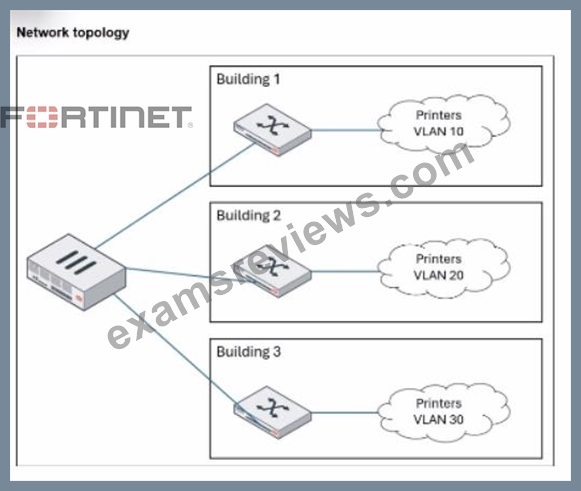
An administrator wants to use FortiNAC-F to automatically provision printers throughout their organization. Each building uses its own local VLAN for printers.
Which FortiNAC-F feature would allow this to be accomplished with a single network access policy?
- A. Logical networks
- B. Device profiling rules
- C. Preferred VLAN designations
- D. Dynamic host groups
Answer: A
Explanation:
The FortiNAC-F Logical Network feature is specifically designed to provide an abstraction layer between high-level security policies and the underlying physical network infrastructure. In large-scale deployments where different physical locations (like Building 1, 2, and 3 in the exhibit) use different local VLAN IDs for the same type of device (e.g., VLAN 10, 20, and 30 for printers), managing separate policies for each building would create significant administrative overhead.
By using a Logical Network, an administrator can create a single entity-for example, a logical network named "Printers"-and use it as the "Access Value" in a single Network Access Policy. The mapping of this logical label to a specific physical VLAN occurs at the Model Configuration level for each network device. When a printer connects to a switch in Building 1, FortiNAC-F evaluates the policy, identifies that the printer should be in the "Printers" logical network, and checks the Model Configuration for that specific switch to see which VLAN ID is mapped to that label (VLAN 10). If the same printer moves to Building 3, the same single policy applies, but FortiNAC-F provisions it to VLAN 30 based on the local mapping for that building's switch.
This architectural approach ensures that policies remain consistent and easy to manage regardless of the complexity or variations in the local network topology.
"Logical Networks provide a way to define a network access requirement once and apply it across many different network devices that may use different VLAN IDs for that access... Each managed device can use different VLAN IDs for the same Logical Network label. You can define the Logical Networks based on requirements and then associate the network to a VLAN ID when the managed device is configured in the Model Configuration." - FortiNAC-F IoT Deployment Guide: Define the Logical Networks.
NEW QUESTION # 28
Refer to the exhibit.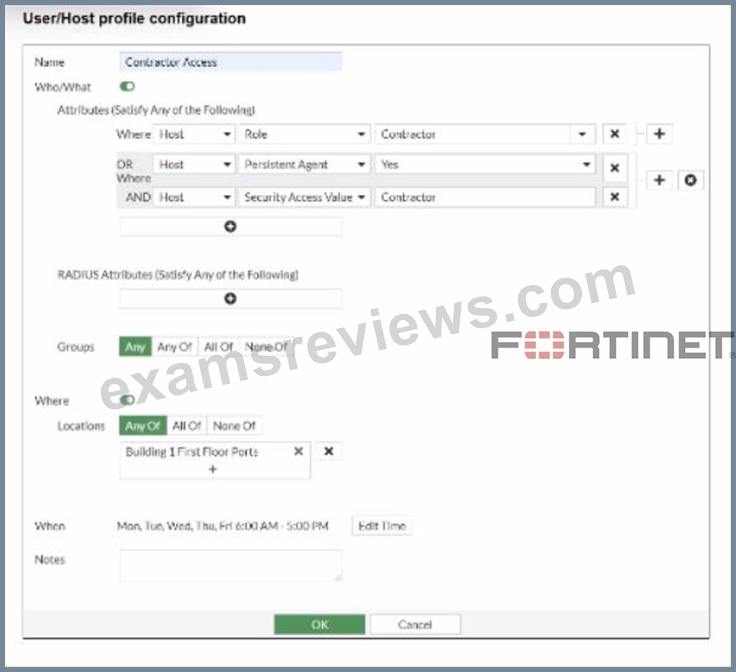
If a host is connected to a port in the Building 1 First Floor Ports group, what must also be true to match this user/host profile?
- A. The host must have a role value of contractor or an installed persistent agent or a security access value of contractor, and be connected between 6 AM and 5 PM.
- B. The host must have a role value of contractor or an installed persistent agent and a security access value of contractor, and be connected between 6 AM and 5 PM.
- C. The host must have a role value of contractor or an installed persistent agent, a security access value of contractor, and be connected between 9 AM and 5 PM.
- D. The host must have a role value of contractor, an installed persistent agent or a security access value of contractor, and be connected between 6 AM and 5 PM.
Answer: B
Explanation:
The User/Host Profile in FortiNAC-F is the fundamental logic engine used to categorize endpoints for policy assignment. As seen in the exhibit, the configuration uses a combination of Boolean logic operators (OR and AND) to define the "Who/What" attributes.
According to the FortiNAC-F Administrator Guide, attributes grouped together within the same bracket or connected by an OR operator require only one of those conditions to be met. In the exhibit, the first two attributes are "Host Role = Contractor" OR "Host Persistent Agent = Yes". This forms a single logical block. This block is then joined to the third attribute ("Host Security Access Value = Contractor") by an AND operator. Consequently, a host must satisfy at least one of the first two conditions AND satisfy the third condition to match the "Who/What" section.
Furthermore, the profile includes Location and When (time) constraints. The exhibit shows the location is restricted to the "Building 1 First Floor Ports" group. The "When" schedule is explicitly set to Mon-Fri 6:00 AM - 5:00 PM. For a profile to match, all enabled sections (Who/What, Locations, and When) must be satisfied simultaneously. Therefore, the host must meet the conditional contractor/agent criteria, possess the specific security access value, and connect during the defined 6 AM to 5 PM window.
"User/Host Profiles use a combination of attributes to identify a match. Attributes joined by OR require any one to be true, while attributes joined by AND must all be true. If a Schedule (When) is applied, the host must also connect within the specified timeframe for the profile to be considered a match. All criteria in the Who/What, Where, and When sections are cumulative." - FortiNAC-F Administration Guide: User/Host Profile Configuration.
NEW QUESTION # 29
While deploying FortiNAC-F devices in a 1+1 HA configuration, the administrator has chosen to use the shared IP address option.
Which condition must be met for this type of deployment?
- A. The primary and secondary administrative interfaces are on the same subnet.
- B. The isolation network type is Layer 2.
- C. There is a direct cable link between FortiNAC-F devices.
- D. The isolation network type is layer 3.
Answer: A
Explanation:
In a 1+1 High Availability (HA) deployment, FortiNAC-F supports two primary methods for management access: individual IP addresses or a Shared IP Address (also known as a Virtual IP or VIP). The Shared IP option is part of a Layer 2 HA design, which simplifies administration by providing a single URL or IP that always points to whichever appliance is currently in the "Active" or "In Control" state.
For a Shared IP configuration to function correctly, the Primary and Secondary administrative interfaces (port1) must be on the same subnet. This requirement exists because the Shared IP is a logical address that is dynamically assigned to the physical interface of the active unit. Since only one unit can own the IP at a time, both units must reside on the same broadcast domain (Layer 2) to ensure that ARP requests for the Shared IP are correctly answered and that the gateway remains reachable regardless of which unit is active. If the appliances were on different subnets (a Layer 3 HA design), a shared IP could not be used because it cannot "float" across different network segments; instead, administrators would need to manage each unit via its unique physical IP or use a FortiNAC Manager.
"For L2 HA configurations, click the Use Shared IP Address checkbox and enter the Shared IP Address information... If your Primary and Secondary Servers are not in the same subnet, do not use a shared IP address. The shared IP address moves between appliances during a failover and recovery and requires both units to reside on the same network." - FortiNAC-F High Availability Reference Manual: Shared IP Configuration.
NEW QUESTION # 30
......
Ace Fortinet NSE5_FNC_AD_7.6 Certification with Actual Questions May 02, 2026 Updated: https://www.examsreviews.com/NSE5_FNC_AD_7.6-pass4sure-exam-review.html
Fortinet Network Security Expert Certified Official Practice Test NSE5_FNC_AD_7.6: https://drive.google.com/open?id=1lened9ghtLJZkBf8U1ZCafMkaSmM_CVW